1 Hour AI-Accelerated
Design Sprint
How do I orchestrate a high-speed design sprint utilizing AI and deliver a useful outcome?
"I want to run a rapid design sprint right now for making a prototype of something I can share as a design sprint example. I'm choosing save the ocean as the problem to solve because it's so large and undoable and people won't notice as much the nuances of deep intimate knowledge being incorrect."
— My actual starting prompt. Honest about my constraints from the first keystroke.
The problem I chose — and why it has real stakes
Illegal fishing isn't a fringe issue. It's a market failure at global scale.
I built a repeatable process, not a one-off experiment
v1 was the starting hypothesis — a compressed GV sprint adapted for solo AI-assisted work. Every stage had a defined job and time budget.
I ran 3 AI assistants simultaneously to research the problem space
Same prompt, three different tools. I evaluated outputs comparatively — not sequentially.
Best formatting and content. Kicked out HMW questions, a user, and a Phase 1 user flow in one shot. Could quickly grok the thinking and agreed with its direction.
Won: Research roundMore verbose on research — hard to digest fast. But Claude's table/bullet format on the elevator pitch iteration got me unstuck faster than run-on sentences with the other tools.
Won: Pitch iterationOnly tool to show images with each problem — refreshing, but too long to scan. Did use my professional background from prior threads to tailor recommendations.
Noted: Memory contextWhat I narrowed to — and why
After aligning all three tools on the elevator pitch, I chose a user and a single workflow to prototype.
Illegal fishing + the evidence gap
Satellites can detect dark vessels. But detection isn't enforcement. Authorities need structured, defensible evidence — AIS gap analysis, SAR cross-reference, zone violations, vessel history — assembled fast enough to act.
The design target: Collapse a 20-minute manual investigation into a 90-second confident decision.
Maritime Intelligence Analyst
Analysts at ocean NGOs, fisheries monitoring centers, coast guard units, and supply chain compliance officers at seafood retailers.
Core pain: Making defensible enforcement decisions with data not built for legal action. Bad escalations damage credibility — so they under-escalate.
The "First Look" — triage in 90 seconds
7 directions in 1 hour — across 6 AI prototyping tools
I ran each tool with the same project context and evaluated outputs comparatively.
No winner selected. Choosing without user research would be guessing.


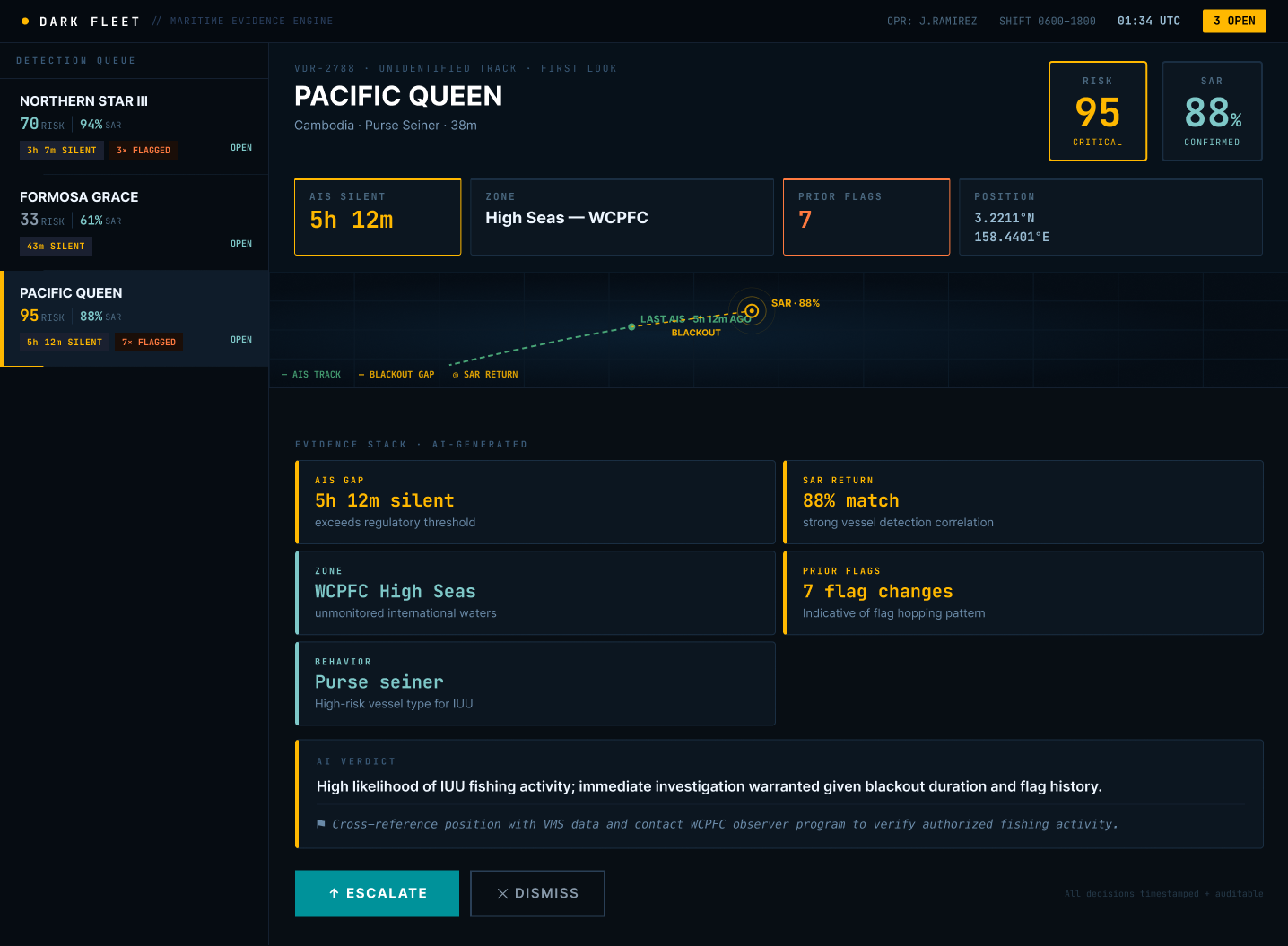
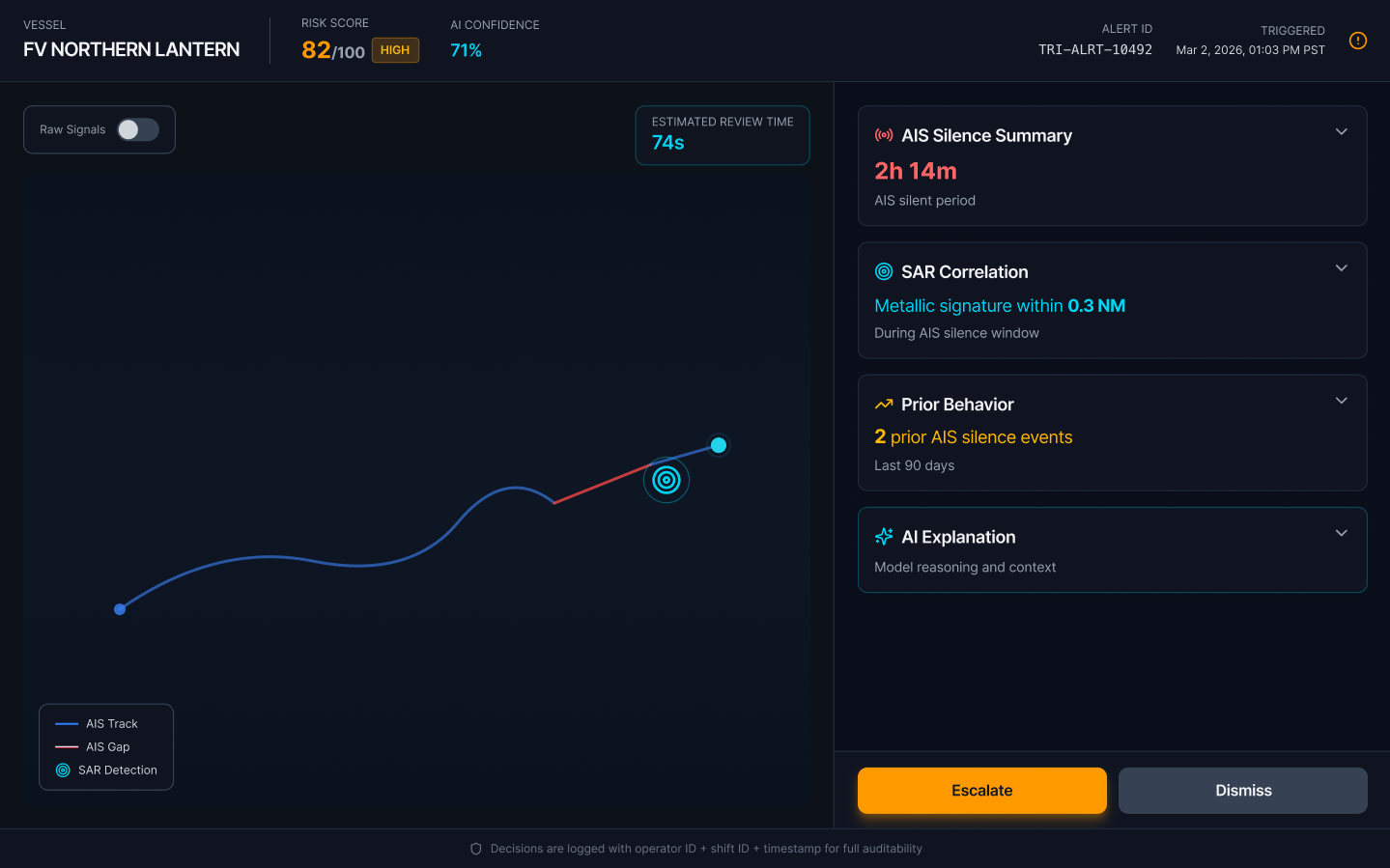


What I looked for
Information hierarchy, accessibility, tone (tool vs weapon), and how example data was represented across each output.
Comparative judgment
Gemini felt less militaristic. Lovable had the most polish. Claude's VS Code had the clearest evidence hierarchy. All had meaningful problems.
Why no winner yet
Choosing a direction without user research is guessing, not deciding. Stopping here is the right call for a concept sprint.
AI created a problem I had to catch
Not flagged by a tool or a reviewer. Caught during Test/Tweak — which is exactly when it should be caught.
AI-generated prototypes defaulted to real country flags and vessel names as primary signals. "CHANG XING 7 · 🇨🇳 CHN · CRITICAL · 94% match" appeared prominently in the triage queue.
Introduces political bias into analyst workflows. Encourages operators to assume nationality correlates with guilt. Flag state doesn't indicate vessel origin — flags of convenience are common in IUU fishing.
AI defaults to salient data. Salience ≠ relevance. Country flags are visually prominent and culturally legible — so the model used them. That's a structural AI behavior, not a one-off mistake.
Design correction: Data → Signal
The fix wasn't cosmetic — it required rethinking what signals the UI should surface.
Country of flag state used as the primary identity signal.
Human review caught what AI missed. AI surfaced nationality cues because they're salient. Product judgment identified the ethical and interpretive risk. Moving fast didn't mean moving carelessly.
What I skipped — and why it happened
Not confessions. A process diagnosis. Each miss traces to a structural gap in v1 — which is exactly what v2 fixes.
The sprint changed the process
Every v2 change traces directly to a Sprint 1 miss. The loop on Research & Explore is intentional — that phase is meant to iterate.
Sprint 1 closed with a Go decision. The concept has legs. The process is better. What comes next isn't another sprint — it's a structured validation phase before narrowing further.
What comes between sprints
Not every next step is a full sprint. This phase validates before building further — and may loop before moving on.
Fair Seas · Sprint 1 · Cami Farley
The 1-Hour Sprint
I wanted to build a repeatable process, not a one-off experiment
v1 was my starting hypothesis